Magento Full Page Cache is a Best in Class extension that makes Magento super fast, can increase your search engine rank, helps reduces server response times, reduces hardware requirements and costs, and makes your Web site more responsive when customers are browsing, adding items to their shopping cart, or checking out.
A fast Magento store places higher in search engines 1 and can lead directly to increased profits for your stores(s). Amazon.com has written that for every 100ms of latency costs them 1% in profit. Although none of us operate at the same level as Amazon.com, with Extendware's Full Page Cache extension, your store will run at its fastest.
Also, we offer a 30-day No Hassle Refund Policy We are that confident that our Magento Full Page Cache extension is the best solution on the market.
Why can we say that? Because we are selling the only real Multi-Level Page Caching Solution and we engineer it such that the primary level cache does not even have a database connection - which means your stores First Byte Time will be reduced as much as possible.
What makes the Extendware Full Page Cache the best page cache for Magento Store Optimization?
Very Limited Database Usage - Extendware's FPC uses a super fast primary cache so that it does not have to touch the database for over 90% of all actions.
Why does that matter? Because every time your application or store makes a call to the database, it slows down your page processing because your system has to wait for the database to respond. One call won't make much of a difference, but a few hundred database calls every transaction will really slow down your page response time.
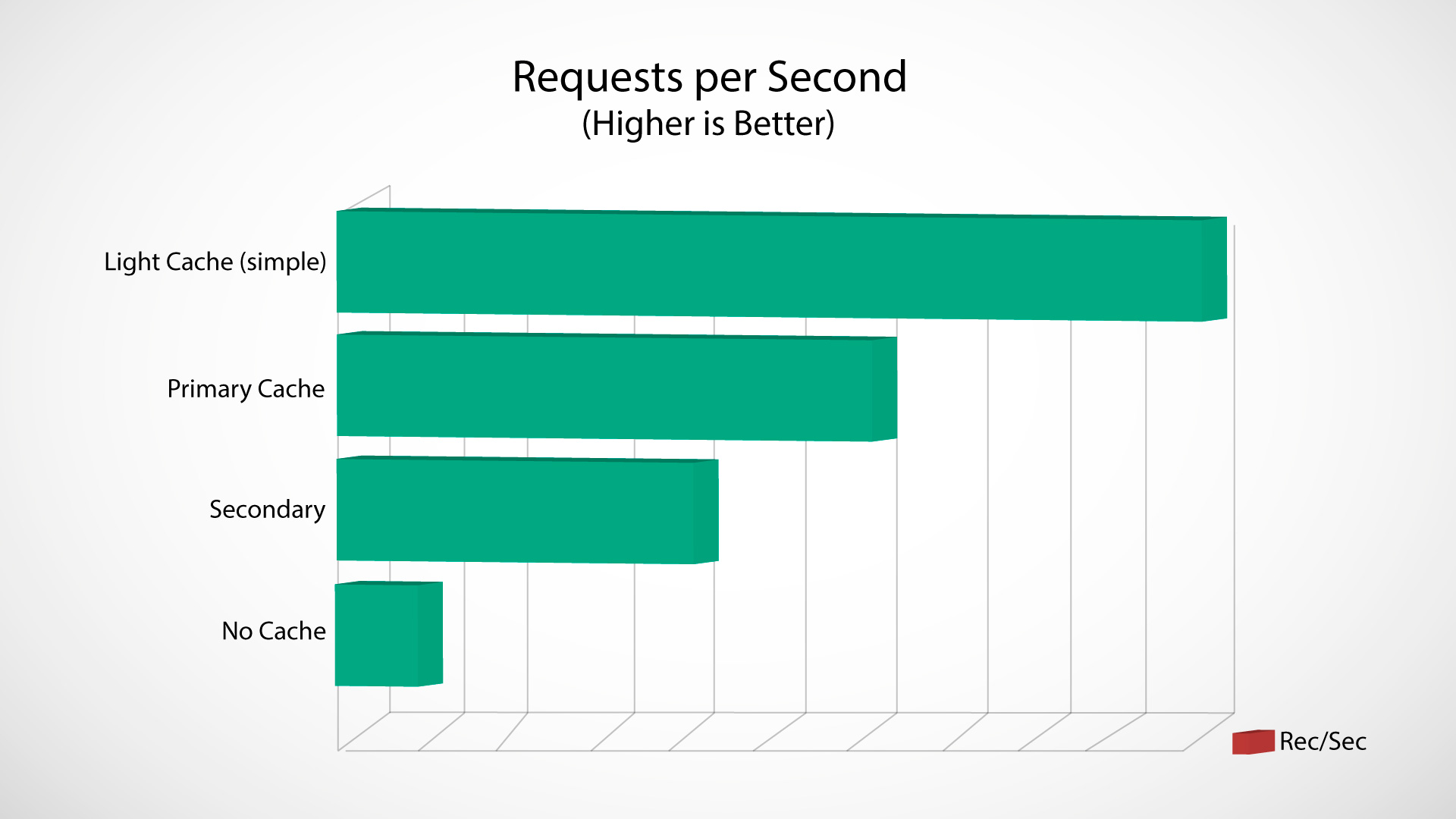
Our Magento Full Page Cache gets around this by handling 90% of your requests in memory, not by calling your database, so it is much faster than how Magento's default caching settings work. This translates into a speed similar to a Varnish caching solution, yet with a better cache hit rate, form key support, and our Full Page Cache is much easier to configure.
High Page Cache Hit Rate - Your store will not be fast - even with a good page caching extension - if no one actually uses the cache. That is why a high cache hit rate (the percent of requests that load directly from page cache instead of the database) is important. Our cache has an excellent hit rate that far surpasses the current and previous Varnish caching solutions.
Ability to Flush Multiple Modified Pages - Our extension gives you the ability to flush the entire page cache, flush groups of pages (all product pages, all cms pages), or flush only specific pages of an affected product. Having multiple flushing choices ensures that you don't flush what you don't need to, which increases your cache hit rate.
Easy to Configure - Most stores only need to install it and enable it and it will auto-configure! It couldn't be easier. Only more advanced use-cases or extreme customization require more involved configuration.
Supports Product Catalog Sorting - Extendware Full Page Cache has full support for catalog sorting. Other page caches do not support changing the sort order in the catalog the way Magento does by default. As a result, it is possible for the default category sort order to be cached incorrectly when you are using other full page cache solutions. Our solution won't incorrectly cache the default category sort order.
Highly, Highly Configurable - The out-of-the-box solution page cache is extremely easy to configure and is very simple to just plug and play. However, that does not mean it cannot be configured to operate in different ways for many different environments. The FPC extension includes lots of configuration options so it can fit every use case and grow as your store grows!
Did you know the Extendware Page Cache is really 3 Different Page Caches in One?
Primary Page Cache - A super fast cache that does not even connect to a database, does not generate sessions, and handles most all requests to your store.
Secondary Page Cache - A fast cache with hole punch support which is used after a product is added to a cart or if the customer is logged into your store. ±
Lightening Page Cache - An extremely fast cache that turns your site into static pages. As a result, 5000 pages per second is very reasonable. There is two versions: Simple which is about 2x faster than the primary cache. Then there is Advanced± which is up to 200 faster than the primary cache. Very few stores will have enough traffic for the Advanced mode, so please contact support if your store needs this level of speed.
How Important is a Fast Magento Store? Well consider the following:
Google considers site speed when ranking Web sites and determining how many pages to crawl1
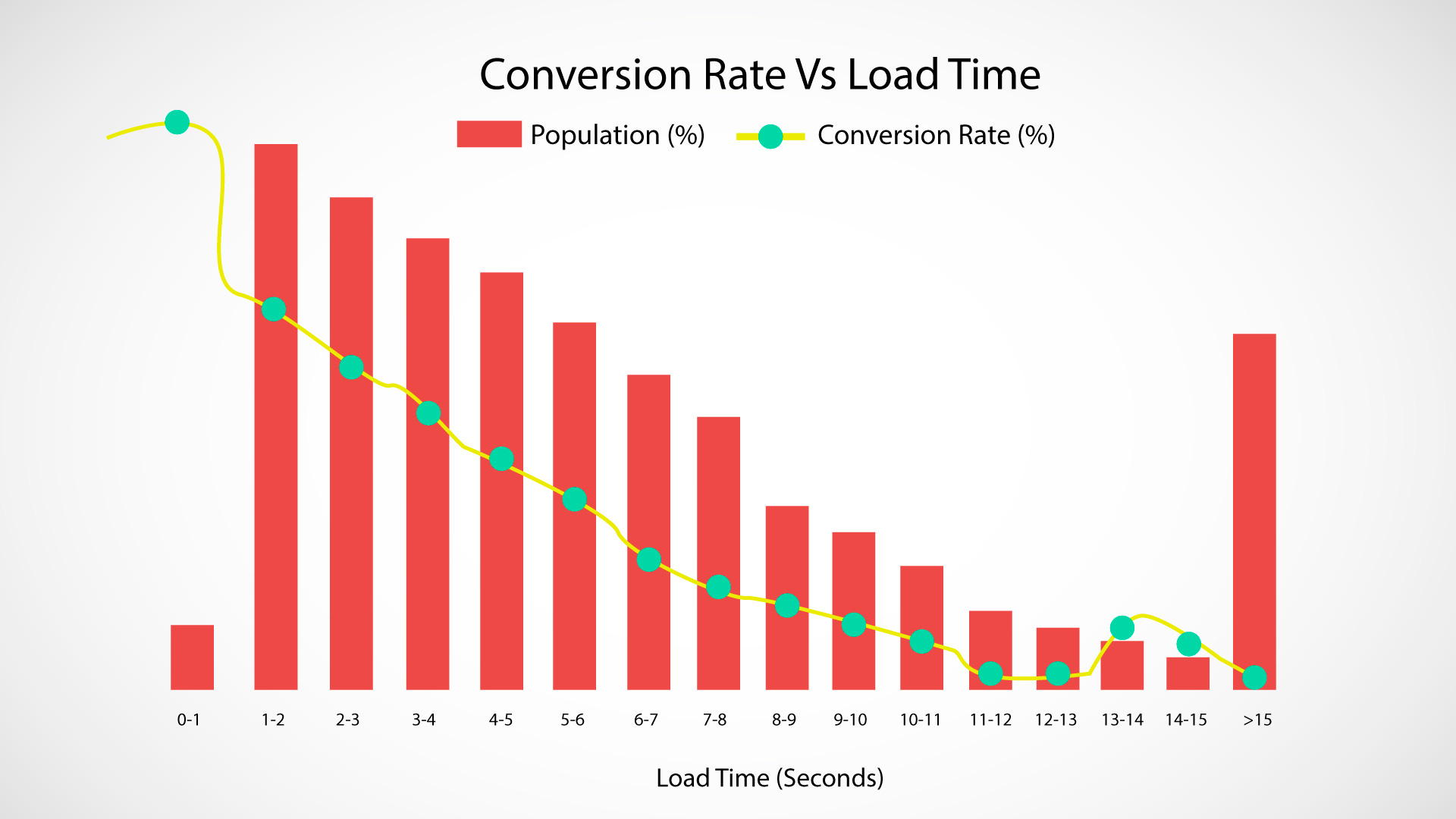
Forrester research has determined that 45% of consumers expect a Web site to render in 2 seconds and 52% said that site speed is important to their site loyalty2
Gomez found that up to 40% of customers will abandon a shopping site if it takes more than 3 seconds to load and every second delay results in a 7% reduction in revenue3
What to Look for in a Full Page Cache Solution:
Many people mistakenly think that all full page extensions are the same. This is not true. Unfortunately, you oftentimes will not realize the limitations of a full page cache solution until after you have used it for a while. Some things to look for when evaluating a full page cache solution are the following:
Ease of Use - The Extendware Page Cache is plug and play for most stores. Our Page Cache has a lot of configuration options so it can cache a variety of cases, but it will auto-configure to your store and in most situations you do not need to change any of the default configuration options. It is that easy!
Accuracy - Many cache solutions cache pages that should not be cached and do not cache pages that should be cached. This issue can be difficult to detect during testing.
The most common issue is how to cache the sorting of products in your product grids. This preference is stored in the user sessions. Most cache solutions either do not handle this correct (the cache gets tainted) or
the cache has to be disabled after sorting which slows down the user experience.
Breadth - Most people only compare cache solutions based on how fast it is on an individual page. The more important thing is how fast it makes your overall site. This is determined
by breadth. This means, how many pages are cached and how often are cached pages being served to end users? Our solution will serve cached pages after a user logs in, adds a product to a cart, it can
easily cache 3rd party extension pages, full page flushing is not required after editing products, and you can even use the Extendware Magento Crawler to help ensure pages are always cached±.
Development - Purchasing a solution that is no longer actively developed / maintained is probably not in your best interest. You can look at the changelog to see how many releases we have released
and to see how we constantly add new capabilities.
Configurability - Configuration needs to be flexible and easy to use. This is related to accuracy and breadth of a cache. In our experience, if configuration is difficult, then store owners will avoid configuring
their site and will not take full advantage of the cache. This is why we made it easy to add support for 3rd party extensions and tweak things, so that you can ensure the extensions performs optimally for your setup.
Tricky to set up (had to ask support) but it's dam fast FPC when it's configured. 4 stars just cause it's hard to use out of the box if you're not well versed in caching Magento solutions. (Posted on 2/10/2016)
We actually had a FPD suite with a very well know extension developer that ultimately backfired within about 4 months and started locking ages up. Our dev recommended this suite, and it improved our metrics incredibly. Everything from the speed metrics to page score. There is some legitimate configuring required sometimes, and Tej and Alana were extremely helpful in getting us running. This is the type of must-have extension that is worth the investment within the first week. We ended up purchasing every performance module we could and are buying our other available extensions here as well. (Posted on 1/21/2016)
The extension did improve the speed a lot, the support is excellent and the work is fast and professional, thank you John and team. Highly recommended company and products. (Posted on 10/7/2015)
I've been using Magento for 1 year I got very known full page cache I thought my fast WRONG BUT I I met extendware page opening time too I currently less than 1 second I would definitely recommend (Posted on 9/12/2015)
We have over 10,000 skus running on our magento multistore setup and it was dreadfully slow to browse our site. After installing the full page cache extension the speed was significantly improved. No more waiting and waiting, the pages load instantly now and we and our customers are very happy.
John was also very helpful in getting our site setup correctly. I highly recommend this extension if you have a large store with several thousand SKUs. (Posted on 8/18/2015)
Absolutely the best solution. I tried 3 other solutions and finally came across this page cache and it is so much faster than any other solution I tried. (Posted on 4/27/2015)
This extension works virtually out-of-the-box and requires very little configuration. The performance boost is exceptional and can easily be felt by the end user.
With support for hole-punching (of all sorts) and quick support tickets with the Extendware team (and John specifically), this extension is what I would call a no-brainer.
Give it a shot, there's nothing to lose with their money back guarantee - and I can guarantee you won't ever look back :)
I didn't expect this to make as much of a difference as it did but WOW, we're extremely pleased!
We had a small snag with some incorrect configurations on our side but John jumped right in and sorted it out right away.
If you're on the fence, do it. Incredible results and the support is top notch! You'll never go back to Magento without an FPC again once you experience the difference in your own shop.
I have 2 stores, one on magento EE and one in Comunity. In our Enterprise server my first cache solution was extendware and it worked as expected. On our second one (community) I tried others (about 3).. it was a complete waist of money and time. I even tested a reverse proxy and other cache solutions like aicache and varnish.. this last 2 are very nice. but they are not really an out of the box solution for magento. they require a tons of time to configure.
the extendware full page cache is the most reliable, cost effective and fastest extension there is.. I fully recommend it along with their addons.
support is one of the best out there.. (Posted on 10/29/2014)
I'm compelled to leave this review because of how insanely fast our site is now. It's really unbelievable. I was under the assumption that the built-in magento cache would suffice. Apparently I was dead wrong! Because the difference is like night and day. The site loads so fast now that it's a tiny flash of content and I'm already on the next page. If you blink, you would actually think you're still on the same page.
Aside from the performance of the extension, the support and response time is great! One of my big fears with using extensions is the support will be slow, unresponsive and then I'm left with something that I have no clue about how to use. This was not the case here. My last email exchange with these guys took less than 10 minutes to get a reply.
I paid for the installation service and even though it says it could take up to 2 business days, it was done within a few hours. I feel very confident trying their products because of the 30 day guarantee, and because my initial experience was so positive, I'm purchasing two more extensions. Really glad I found these guys! (Posted on 7/11/2014)
I was introduced to this Full Page Cache module from extendware. I have to see, it's THE best module i've ever install. I've combined this with the CDN manager and i've been seeing constant 1.5ms load time.
It's like steroid for you Magento installation. Good job guys! (Posted on 1/27/2014)
I would like to express my sincere appreciation to John and his team for the wonderful work they've done for us. We are using 3 of their performance products...
Site Optimizer / Speedster Full Page Cache Full Page Cache Crawler
and the result is just awesome. We have a very heavy site and were really worried about the speed till we started using these products. Now the site is flying and our client is very very happy.
John and his team were there for us all the time and instantly acted on all of our requests. They went out of their way to advise us and assisted at every step. This is one team I have really enjoyed working with. Very prompt, experienced and willing to take a step forward to get things done.
Very Highly recommended.
"Thank you" Extendware and a special "Thank you" to John
Kevin Martin 888.996.9907 ext 99 (Posted on 10/11/2013)
I tried 4-5 FPC extensions. MGT, Lesty, Varnish, Turpentine and etc. but Extendware FPC is amazing. You can configure and install it very easy and fast. I recommend to use FPC with Site Optimizer and Web Crawler. Support is great and very friendly. (Posted on 6/19/2013)
Just awesome, I was getting a 4-5 second time to first byte, and after John helped configure my settings due to another badly written module affected the performance, I am now getting a 0.3 s time to first byte! It has saved my store!!! Eternally grateful I found this module! Cheers (Posted on 6/1/2013)
I have this and the crawler and they are an amazing solution. My page load times shrank, page load in google analytics went down, google started crawling the site more, and browsing the site was possible once again. Thanks for this and thanks for always updating it to include new features! (Posted on 6/25/2012)
I have the page cache + site optimizer + the crawler. No other solution matches this solution, period. Features are constantly being added. It is fast. Support is responsive. I hired them for some custom development and it was affordable and timely. I am very happy with this purchase. (Posted on 5/8/2012)
While Magento EE comes with FPC, it has several logic errors in cache handling. EW's Page Cache fixes all of them. The features we particularly wanted, was the ability to edit products in the backend without "invalidating" the cache and FPC. Now we can edit products without the cache being blown up until we refresh it. Combine this with EW's cron controlled crawler and your site will fly. TCO is lowered big time. Can't say enough about John's professionalism in bug fixes and configuration assistance. We tried two other solutions for FPC and both failed miserably in comparison to EW's Page Cache. (Posted on 4/7/2012)
I have tried 3 competing solutions and every one had some issue that developed under use (caching the wrong pages, not caching pages,being hard to configure, etc). This extension is the best. I have used it for over 2 months with no problems, it is easy to use, and does everything it says it will do. Best of all, the features keep on coming. (Posted on 3/20/2012)
Where should i start ?! We was shopping for similar full page cache solutions for weeks and came across this extension... it's definitely must buy. Forget about the other similar extensions out there too complicated. This Full Page Cache is easy use and you can do everything thru the extension admin menu.
Get the following for top results:
site optimizer / speedster + install + Full Page Cache + install
note: if you need to have some special setups or punch holes just ask for a quote they are reasonable and they will make sure job gets done 100% always explaining you what has be done and why. Special thanks to John
Louis - Magento Store owner since 2008 (Posted on 2/27/2012)
The extension really made a difference on speed!. John not only arrange time to install in hours that would not affect our store, but also suggestions on the improvement of the page and layout distribution. I very satisfied with the speed and support response! (Posted on 2/15/2012)
I installed this on my slow site and everything worked great. I had an installation issue, which support took care of quickly. My server load has decreased as promised and my site feels so much faster. Really an outstanding product. (Posted on 2/6/2012)
I have installed this for 5 days so far. I could not believe the difference in my page load and how my servers were just zooming along. I have tried 3 full page cache "solutions" and this is the only one that worked. It is sooo easy to easy and came with an manual. John helped when I had problems. I love the new speed! (Posted on 1/19/2012)
Write Your Own Review
Product Tags
Use spaces to separate tags. Use single quotes (') for phrases.